Building an Empathic Voice Assistant

To date, most AI Assistants (chatbots) have been built to be utilitarian, with little consideration for the user experience of the human interacting with it. When seeking help, humans generally prefer a warm helpful response. When a chatbot/voicebot responds with cold facts and no empathy, it triggers negative feelings of frustration and distrust in users.
I was challenged to build a more empathic chatbot that humans would want to use. The hypothesis: adding empathy to responses could establish a bond with the human from the start, which could lead to them more readily accepting help from an AI Assistant.
Voiceflow
Our design team has been exploring AI tools, and Voiceflow caught my attention for its singular focus on designing and building voice apps. I strongly believe in a future where more natural interactions will be the norm, and screens rarer and rarer, so software using AI to build voice apps? That’s intriguing!
Introducing Symtolog: a Migraine Tracker
To stay motivated to learn, I chose a topic that personally affects me: migraines. Migraine attacks present a use case where voice interaction could be particularly impactful, which is how the idea of a Migraine Tracker emerged.
AI Image generated with @stableDiffusion through Poe.com
Two Problems with Current Migraine Tracking
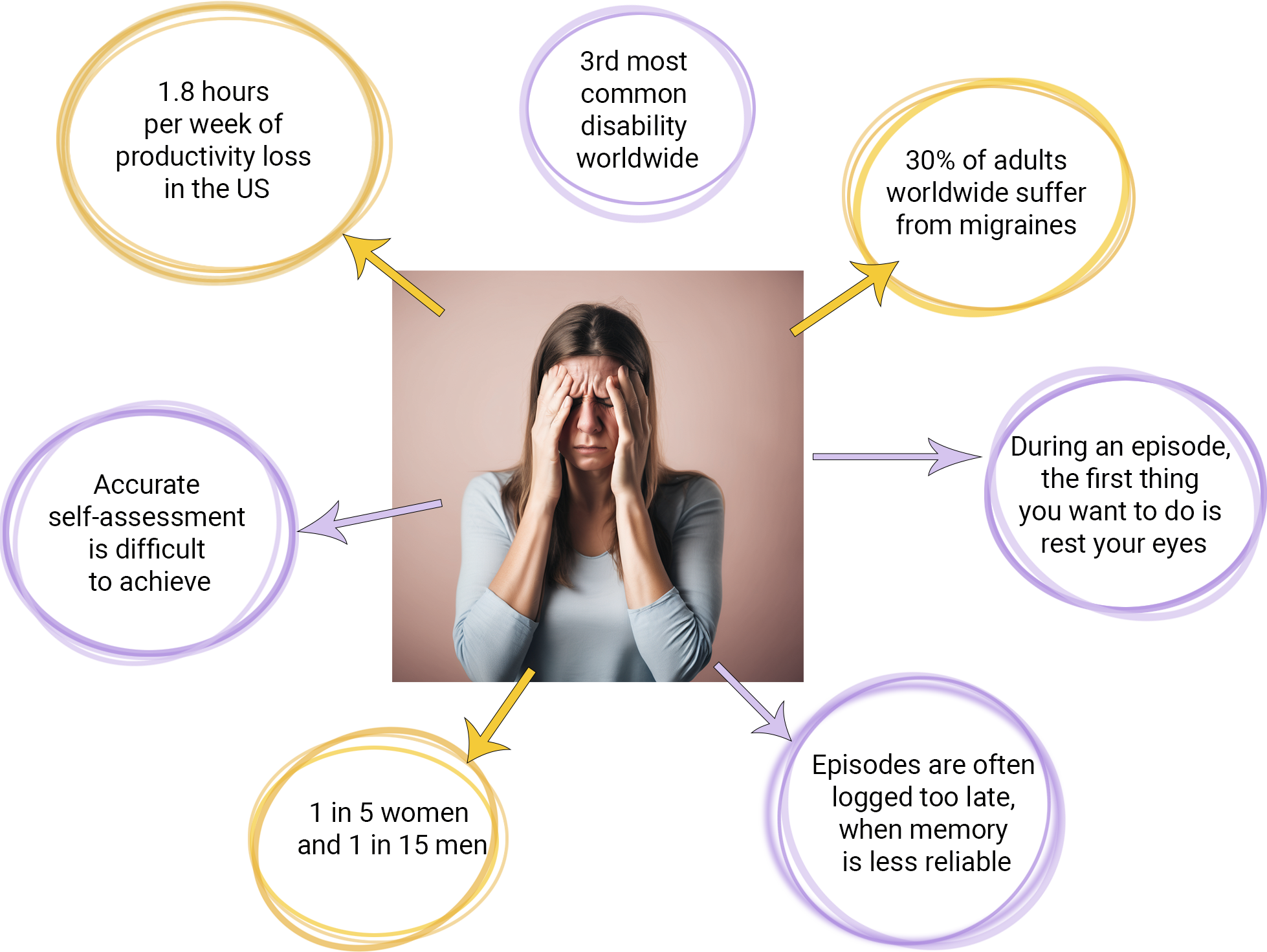
Worldwide, 30% of adults experience migraines, causing disability and lost productivity. To track migraines, there are a lot of digital tools available online but they mostly work on the same text-based model. They miss two critical user experience issues:
During a migraine episode, you don't want to log details in an app as it strains your eyes and increases cognitive load, intensifying pain
Self-assessments are often inaccurate because they are logged after an episode, when the memory of it is not as fresh, resulting in poor data.
A voice assistant could address these issues by enabling hands-free, timely tracking. Frankly, during a migraine attack, looking at the lit screen of your phone is the last thing you want to do. You want a fast, natural way to communicate your symptoms, just as you would tell them to a doctor or a nurse. Therefore, a voice bot makes sense.
The Scientific Approach
Now that I had the what, why and how, I needed a structure to ensure the right information would be logged. I researched medical frameworks like the HURT questionnaire and MIDAS assessment test, and the Migraine Screen Questionnaire (MS-Q) which aim to evaluate migraine triggers and analytics through specific question sequences.
Building the Prototype
I created a logical flow mimicking the medical approach, covering migraine onset, duration, intensity, location, pain type, aura symptoms, and associated symptoms like nausea and fatigue.
In Voiceflow, I built a basic prototype with speak/listen features to test the logic. It worked, but was still too rudimentary. I wanted to go a step further to convince the human that the bot would be smart enough to adapt to them, by having it demonstrate flexibility in its responses.
Baking in Empathy
I purposely chose a voice that sounded calm and soft, which happened to be a woman's voice with a British accent. I added instructions for the AI to demonstrate empathy in its responses. Beyond integrating an empathic responses in an appropriate voice, I also needed to design the flows to tailor the AI to accommodate the user's needs:
to be able to be interrupted by the human without the AI being derailed or repeat itself would be key to gaining users’ trust
to follow a systematic order, but allow it to be influenced by the user’s answers. For example, the ability for the patient to skip ahead and have the AI follow their lead, would be key to reducing frustration
to end a session at any stage if the patient needed to stop
to offer a followup checkin
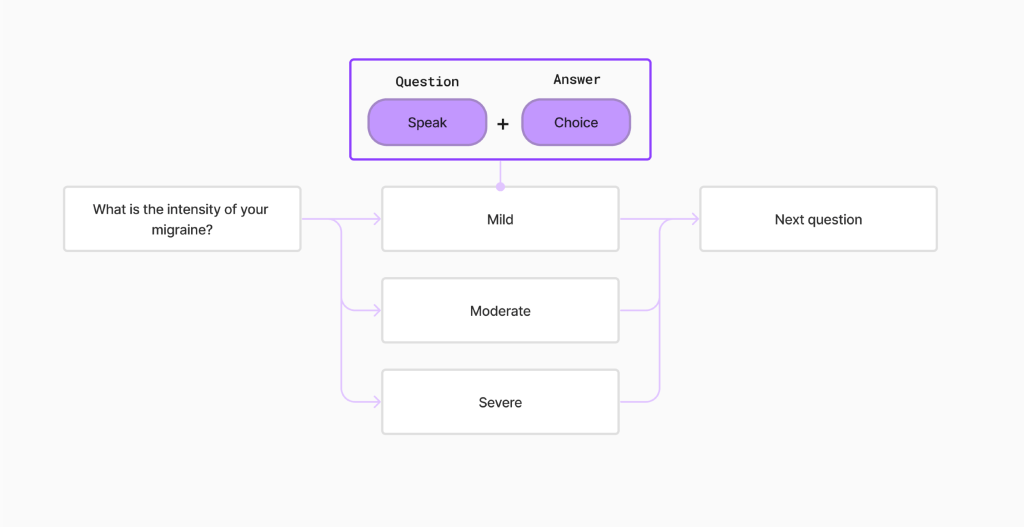
Applying Conversational Design Principles
To make the exchange more fluid and natural, I adapted conversational design principles to the unique challenges of voice-based interactions:
Keep prompts short and simple
Avoid unnecessary verbosity in answers
Allow interruptions and rephrasing for clarity
Allow 2 to 3 seconds to capture a user’s answer
Refining the AI Response and Intent
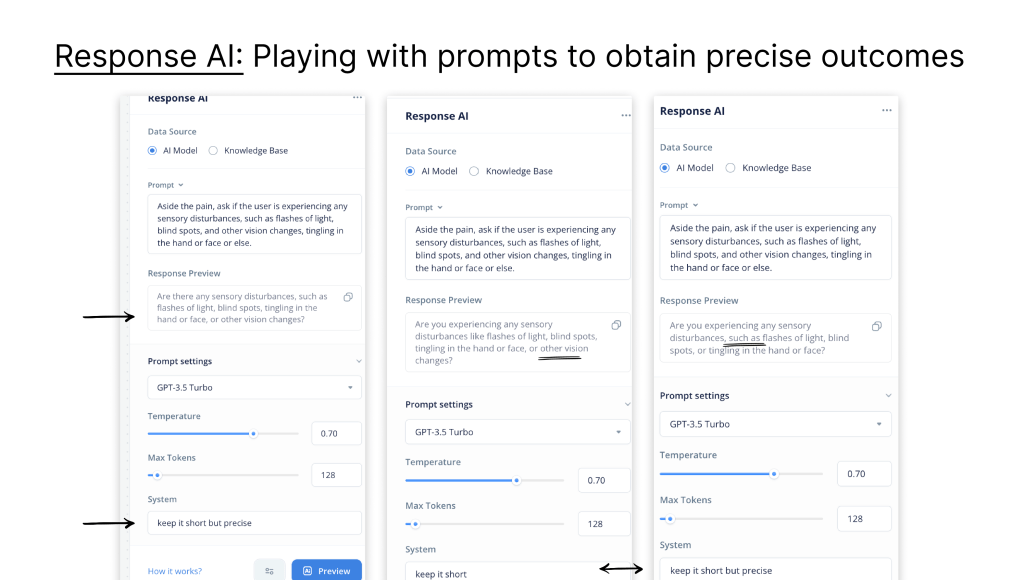
Voiceflow's generative AI response feature generated multiple prompt variations based on my initial prompts, which I could then tweak for precision.
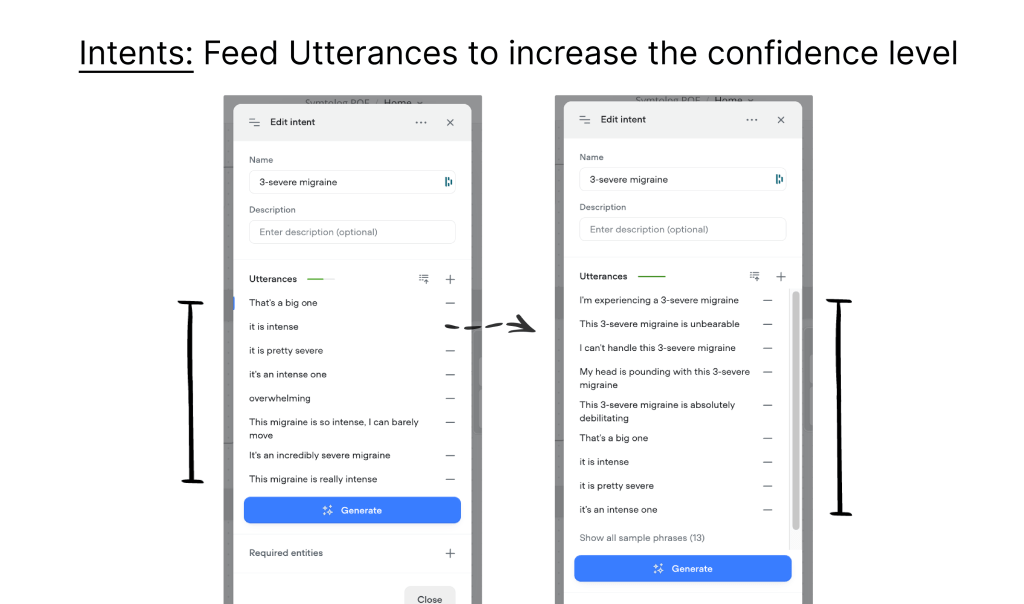
The intent feature helped categorize user utterances, enabling appropriate response branching.
The Current Prototype and Limitations
With all of these improvements, I ended up with a more precise prototype but also a more complex one. While more stable than initial versions, the current prototype still struggles with non-native accents, unexplained instabilities, prompt loops, and short answer windows. However, it demonstrates the core functionality and potential.

Recording of a Symtolog demo
Next Steps
Going forward, I aim to:
Add timestamps for better episode tracking
Store transcripts outside Voiceflow
Further refine utterance categorization
Optimize prompt phrasing for brevity
Collaborate with technical experts and beta testers
Summary (tl;dr)
Building empathy into an AI Voice Assistant includes more than just writing sensitive content. It requires a deep understanding of user needs, and then designing the UX flow to allow users multiple ways to skip ahead to the correct next step or go back, all using voice-only input.
Symtolog shows promise in using voice technology to improve migraine tracking. With continued iteration and feedback, it could become a powerful tool for migraine sufferers worldwide.